

There are several issues that can arise when using a Citrix NetScaler as a SAML IDP. Although SAML is a great standard and defines very well how SAML works, some details are implementation-dependent. Many of the problems that arise stem from misunderstandings between SP and Citrix NetScaler IDP.
Problems can occur in two places: on the way from the SP to the IDP and on the way back from the IDP to the SP.
Citrix NetScaler IDP is not responding at all
You are seeing a 404 not found or other HTTP error. The reason for this is likely that the SP is not addressing Citrix NetScaler IDP at the correct address. The correct address is: https://<IDP-FQDN>/saml/login.
The Citrix NetScaler IDP does not authenticate
The Citrix NetScaler IDP outputs the following message: ACS URL in request is invalid. Please contact your administrator
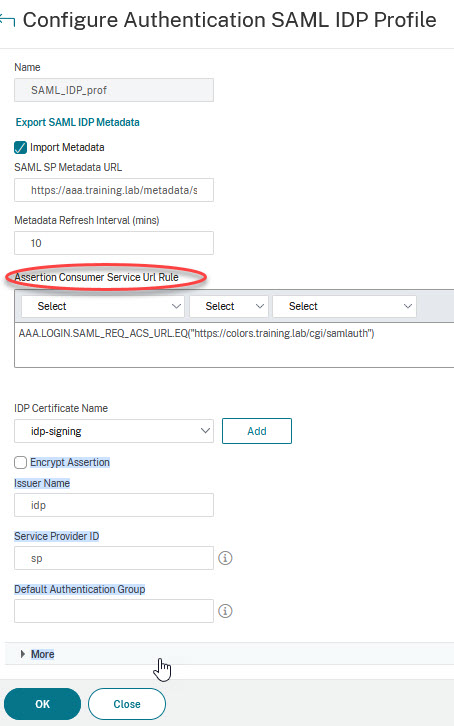
This message appears when the ‘Assertion Consumer Service Url Rule’ in the SAML IDP Action is set incorrectly.
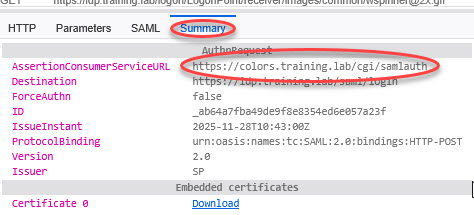
It disappears immediately when you simply enter true in the field instead of a meaningful expression. Of course, this is not a good solution. The correct value is AAA.LOGIN.SAML_REQ_ACS_URL.EQ(‘https://<SP-FQDN>/<SP's assertion consumer URL>’). If you do not know the correct value, you can check the assertion that the SP posts to the IDP. I recommend the browser plugin SAML-Tracer for this purpose. Find the message (highlighted in orange) from the client to Citrix NetScaler IDP, then click Summary in the lower field. The AssertionConsumerServiceURL is the value you are looking for. In my case, it would be https://colors.training.lab/cgi/samlauth and the correct expression would therefore be AAA.LOGIN.SAML_REQ_ACS_URL.EQ(‘https://colors.training.lab/cgi/samlauth’).
The Citrix NetScaler IDP outputs the following message: Issuer name presented does not match configured value. Please contact your administrator
In this case, a service provider ID is specified that does not match the ID sent by the SP. In this case, too, the easiest way to find the correct value is to use the SAML tracer. Find the message (highlighted in orange) from the client to Citrix NetScaler IDP, then click Summary in the lower field. The value you are looking for is Issuer. In my case, the issuer is called SP.


Citrix NetScaler IDP authenticates, but login to the SP does not work
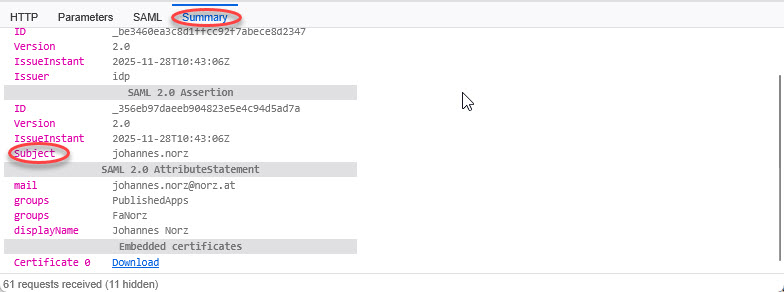
These problems are due to misunderstandings between Citrix NetScaler IDP and the SP. Usually, the reason is that the attribute containing the user name is not recognised by the SP. Citrix NetScaler passes the user name in the Subject attribute. In this case, the SP is usually adjusted to use the Subject attribute. If this is not possible, an additional attribute can be created in the IDP in which the user name is entered.
Another reason could be that the username used to log in to Citrix NetScaler IDP is not the one expected by the application. In this case, you also need to create a new attribute in which the correct attribute from the directory is transferred. I have attached a screenshot of the SAML tracer, where you can see the subject attribute and self-defined attributes.
Whatever the reason, the solution can be found in a blog article I wrote a few days ago, here.

