

IDP-initiated single sign on (SSO) login on Citrix NetScaler is not directly supported. That’s the bad news. The good news is that with a little trick, you can get it to work quite well.
What is the problem? Actually, everything you need is already there. The problem is simply that you cannot bind traffic policies to authentication vServers. Traffic policies support SAML SSO. So we have to start differently.
We begin our trick on the NetScaler that is supposed to deliver the SAML IDP. We create a content switching vServer on this NetScaler. This should point to the host name of the SAML IDP vServer that users will be using. Then we need an SSL load balancing vServer, which is purely a dummy, i.e. it doesn’t point anywhere. This is created by binding a service that does not use health monitoring.
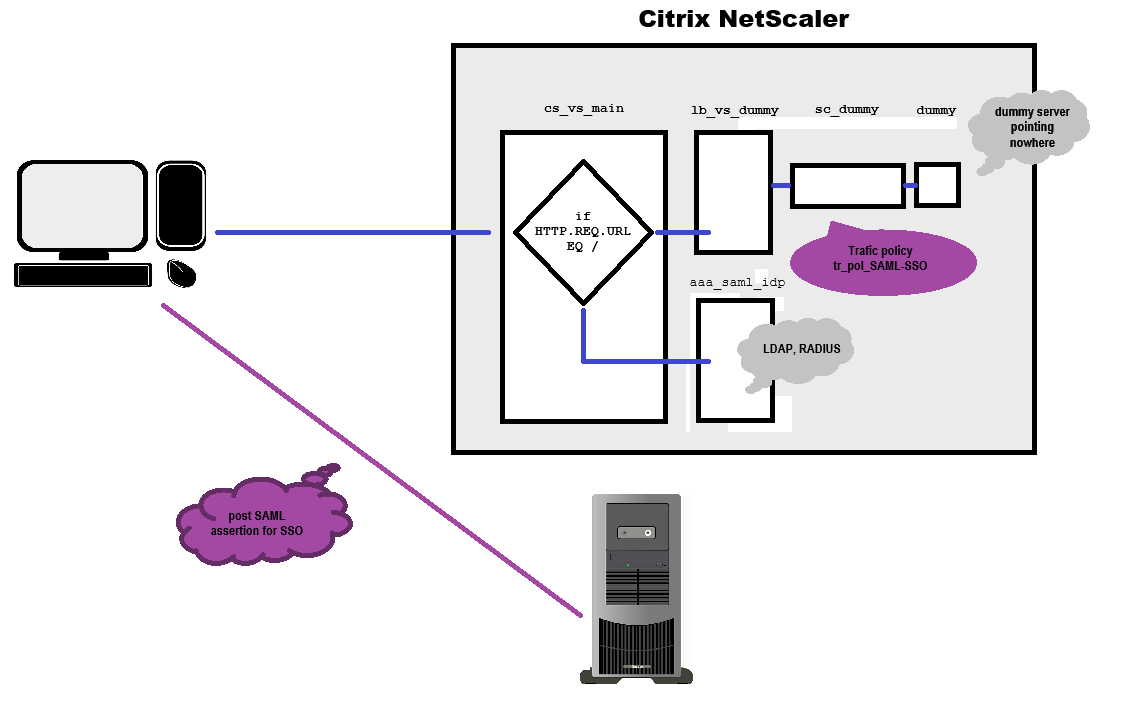
The Load-Balancing vServer
add server dummy 192.0.0.1
(a non-existing dummy server in the IETF private network 192.0.0.0/24)
add service sc_dummy dummy SSL 443 -healthmonitor NO
(creates an SSL service using the dummy server we created before)
add lb vserver lb_vs_dummy SSL
(creates a non-addressable SSL loadbalancing vServer)
bind lb vserver lb_vs_dummy sc_dummy
(binds the service to the loadbalancing vServer)
bind ssl vserver lb_vs_dummy -certkeyname <certificate name>
(binds the certificate to the load-balancing vServer. The certificate has to exist on the NetScaler)
The authentication vServer
add authentication vserver aaa_saml_idp SSL
creates a non-addressable authentication vServer)
bind ssl vserver aaa_saml_idp -certkeyname <certificate name>
(binds the certificate to the authentication vServer. The certificate has to exist on the NetScaler)
You have to bind an authentication policy (or an n-factor flow) to your AAA authentication vServer. Usually, LDAP/RADIUS is used for authentication. Next have to enable Authentication for our load-balancing vServer:
set lb vServer lb_vs_dummy -AuthenticationHost <FQDN> -Authentication ON -authnVsName aaa_saml_idp
FQDN is the Fully qualified domain name users will use to access our setup.
The content switching vServer
add cs vserver cs_vs_main SSL 443
(creates the content-switching vServer)
bind cs vserver cs_vs_main -lbvserver lb_vs_dummy
(sets the load-balancing vServer lb_vs_dummy as the default load-balancing vServer)
bind ssl vserver cs_vs_main -certkeyname <certificate name>
(binds the certificate to the content-switching vServer. The certificate has to exist on the NetScaler)
The Contentswitching-Policy
To enable authentication, it is necessary to send the requests related to authentication to the AAA server. During my tests, I used two host names for this when logging in, both pointing to the same IP address: test.training.lab and testauth.training.lab. All entries that point to testauth.training.lab belong to authentication process. It turns out, these are all URLs that are not empty (/).
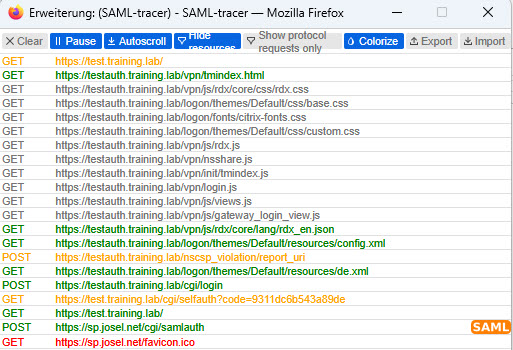
The content switching policy is therefore simple:
add cs action cs_act_aaa-vserver -targetVserver aaa_saml_idp
(aaa_saml_idp ist mein AA vServer)
add cs policy cs_pol_authentication-vserver -rule "HTTP.REQ.URL.EQ(\"/\").NOT" -action cs_act_aaa-vserver
(The policy forwards everything whose URL is not / to the AAA vServer.)
The traffic policy
The traffic policy is responsible for single sign-on. After successful authentication, it posts a request to the SAML service provider, which logs in the user. The traffic profile consists of two components: the actual traffic profile and the SAML SSO profile. The traffic profile is a simple thing: it sets single sign-on to ON and addresses the traffic profile.
The traffic profile corresponds pretty much exactly to a SAML IDP profile. Everything I have written here about SAML IDP profiles also applies to the SAML SSO profile, of course.
The SAML SSO Profils:
add tm samlSSOProfile saml_sso_prof -samlSigningCertName <SAML-Signing-Cert> -samlSPCertName <SP-Signing-Cert> -assertionConsumerServiceURL <Logon URL at the Service Provider> -relaystateRule true -samlIssuerName <IDP Name> -audience <SP Name> -NameIDExpr AAA.USER.NAME
- samlSigningCertName: Name of the certificate that the IDP uses to sign the assertion
- samlSPCertName: Name of the certificate that the SP uses to sign the assertion
- assertionConsumerServiceURL: The URL to which the service provider wants the assertion to be posted. The URL is implementation-dependent. For Citrix NetScaler, it is https://<FQDN>/cgi/samlauth.
- relaystateRule: Must be true if the SAML response is successful (https://developer-docs.netscaler.com/en-us/adc-command-reference-int/current-release/authentication/authentication-samlaction). In our case, you can simply specify true.
- samlIssuerName: Freely selectable name of the SAML IDP. It must be the same name as specified at the service provider.
- audience: Name of the SAML SP (can also be left blank here)
- NameIDExpr: The field that passes the desired user name, typically AAA.USER.NAME
The traffic action
add tm trafficAction tr_prof_SAML-SSO -samlSSOProfile saml_sso_prof -SSO ON
The Trafic action sets single sign-on to ON and references the traffic profile.
The traffic policy
add tm trafficPolicy tr_pol_SAML-SSO true tr_prof_SAML-SSO
I used a simple TRUE value because, in this setup, every request to the empty URL that does not trigger authentication should trigger the traffic policy with the redirect to the SAML SP.
The traffic policy has to get bound to the lb vServer:
bind lb vserver lb_vs_dummy -policyName tr_pol_SAML-SSO -priority 100 -gotoPriorityExpression END -type REQUEST
That’s all there is to it, not particularly difficult, as I must say in retrospect.

